Pet Inventory
Petting provides a custom inventory interface for all tamed pets, allowing players to manage equipment, armor, weapons, saddles, and tactical settings.
Opening the Inventory
To open a pet's inventory:
- Look at an owned pet within reach.
- Press Shift + Right-Click (or your custom key bound to Open Pet Inventory).
- You can also open the inventory while actively riding your pet.
The inventory will only open if you are the pet's owner and within interaction distance.
[!NOTE]
IfenablePetInventoryis disabled inpetting-synced.toml, pets operate solely on server defaults, cannot open inventory screens, cannot equip items, and cannot be custom-ridden.
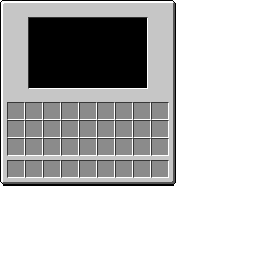
Inventory Layout & Slots
The inventory dynamically adapts its slots based on the mob type:
+-----------------------------------------------------+
| [Tabs]      [3D Pet Preview]         [Collar Slot]  |
| [Home]                               [Saddle Slot]  |
| [Collar]    [Armor / Body Slots]     [Main Hand]    |
| [Riding]                             [Off Hand]     |
+-----------------------------------------------------+
|              [Player Inventory: 3x9]                |
|              [Player Hotbar:    1x9]                |
+-----------------------------------------------------+
1. Left Equipment Slots
- Humanoid Mobs (Zombies, Skeletons, Illagers, Piglins, etc.):
- Four standard armor slots: Head, Chest, Legs, and Feet.
- Quadrupeds & Animals (Horses, Wolves, Llamas, etc.):
- One Body Slot for specialized armor (Horse Armor, Wolf Armor, or Carpets).
2. Right Equipment Slots
- Collar Slot:
- Accepts any collar from the
#petting:collarstag. - Equipping a collar unlocks the Collar Tab.
- Saddle Slot:
- Accepts any saddle (
#minecraft:saddles). - Equipping a saddle grants full steering control when riding and unlocks the Riding Tab.
- Hand Slots (Main Hand & Off Hand):
- Present on humanoids and select mobs (Foxes, Allays, Vexes, Endermen).
- Can hold weapons, tools, bows, shields, or items.
- All equipment equipped on pets drops with a 100% drop rate if the pet dies.
- Chest Storage Slot:
- Available on pack animals (Donkeys, Mules, Llamas).
- Accepts chests, trapped chests, or barrels to provide carrying capacity.
Navigation Tabs
Tabs appear on the upper-left margin of the GUI:
Home Tab
- Icon: Lead
- Availability: Visible whenever a Collar or Saddle is equipped.
- Function: Returns to the default equipment slot view.
Collar Tab
- Icon: Collar
- Availability: Appears when a collar is placed in the Collar Slot.
- Function: Provides real-time tactical control over the pet's AI:
- Combat Mode: Cycle through
PASSIVE,DEFENSIVE,AGGRESSIVE,WANDER, andGUARD. (See Combat Modes). - Distance Slider: Adjusts follow distance, wander radius, or patrol search radius. Range: 2 to 32 blocks (configurable).
- Teleport Slider: Adjusts teleport trigger threshold (range: 8 to 64 blocks, configurable).
- Teleport Toggle: Turns teleportation ON or OFF.
- Ranged Toggle: Commands the pet to prioritize ranged bow attacks over melee combat.
- Defend Toggle: Commands the pet to protect fellow pets owned by you.
- Retaliate Toggle: Commands the pet to immediately fight back when attacked.
- Reset Defaults: Resets all collar settings to the server configuration defaults.
Riding Tab
- Icon: Saddle
- Availability: Appears when a saddle is placed in the Saddle Slot (for custom-saddled pets).
- Function: Displays riding status and controls:
- Status Indicator: Displays
Controlled (Saddled)orUncontrolled (No Saddle). - Attack on Click Toggle: (Default ON). Pressing Attack (Left Click) while riding commands your pet to attack or launch projectiles.
- Auto-Attack Hostiles Toggle: (Default OFF). When enabled, your ridden pet automatically targets and strikes nearby monsters.
- Controls Guide: A built-in cheatsheet of riding movement keys (WASD, Jump, Sneak, Dismount).
Related Pages: Collars · Combat Modes · Riding · Configuration